
Reels & Story Maker Storybeat
StorybeatPhotography
4.41.01K Reviews
- Version
- 4.40.3.0
- Installs
- 10.00M
- Age Rating
- Everyone
Screenshots




Our Review of Reels & Story Maker Storybeat
 Analysis by Appyee
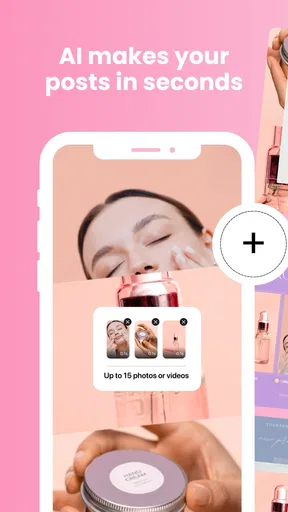
Storybeat caught my attention for a simple reason: it turns a camera roll into something that feels ready to share without asking me to learn a full desktop-style editor. I tested it as a mobile photography app for quick stories, short videos, music-led edits, captions, filters, effects, templates, and avatar-style content. My first impression was genuinely positive, especially when I wanted a polished result in a few minutes rather than a carefully edited production.
That first-week appeal is easy to understand. I could begin with photos or video clips, choose a visual direction, add music, and adjust the result until it felt more personal. The experience is aimed at people who want movement and atmosphere in their posts, not just a row of still images. At the same time, the important question is not whether the app can make an attractive result once. It is whether I would still open it after the novelty of templates and effects had faded.
What Storybeat feels like in everyday use
The app comes from Storybeat and sits in the photography category, although its practical role is closer to a compact social-content studio. Its store summary presents it as an AI photo and video editor with music, templates, filters, effects, captions, and avatars. That combination gives it a broader feel than a basic collage tool, while keeping the workflow more approachable than a traditional timeline editor.
I found the strongest use case in moments that are worth sharing but not worth spending half an hour editing. A weekend walk, a birthday gathering, a small product showcase, or a sequence of travel photos can become a short story with more rhythm than a standard slideshow. The app is especially useful when the raw material is already decent and I mainly need help with pacing, decoration, and presentation.
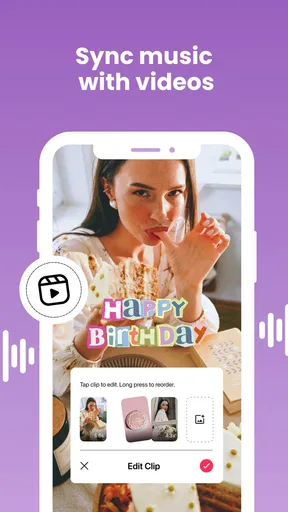
For example, after taking several clips at a family lunch, I would not want to arrange every transition manually on a phone. A template-led workflow lets me select the useful moments, add a song, place a short caption, and export something that feels intentional. The result still depends on choosing clips with similar lighting and avoiding too many competing effects, but Storybeat reduces the amount of technical work between the camera roll and a shareable post.
The real strength is speed with a recognizable visual finish. This is not the same as giving complete creative control. It is more like having a set of guided starting points that help me avoid a blank canvas. That distinction matters: people who enjoy designing every frame may find the structure restrictive, while people who normally abandon editing apps halfway through may appreciate the direction.
The first week: attractive results with very little setup
During the first few sessions, the variety is the main hook. Templates can change the mood of the same group of photos, while filters and effects offer quick ways to make ordinary material feel more cohesive. Captions are useful when the images need context, and music can make a sequence feel less static. Avatars add another playful layer for users who want something more expressive than a conventional photo post.
I recommend starting with a small selection rather than importing everything from an event. Choosing a handful of clips with a clear beginning, middle, and ending usually produces a cleaner story than filling every available slot. This is one of the less obvious lessons with template-driven editors: more material does not automatically create a richer edit. It often makes the pacing feel crowded.
The app is free to install and is suitable for Everyone, which makes it easy to try without committing money at the beginning. There are in-app purchases ranging from $0.99 to $29.99 per item, so I would spend a little time testing the free workflow before deciding whether the extras justify the cost. The important point is not simply that optional purchases exist, but that a template-based app can encourage impulse decisions when a particular style fits the moment perfectly.
On Android, it requires version 6.0 or later. That gives it a reasonably broad reach, though the experience can still vary depending on the phone, available storage, camera quality, and how much video is being processed. I would keep original clips available until I had checked the finished export, particularly when the content matters. Mobile editing is convenient, but it is not a substitute for keeping a safe copy of the source material.
Where it beats ordinary alternatives
Compared with a basic gallery editor, Storybeat offers more personality. A gallery tool is excellent for cropping, correcting light, and making a single image presentable, but it usually does not provide the same sense of sequence. Storybeat is better when the story is about several moments working together, especially with music and timed visual changes.
Compared with a full video editor, it is less intimidating. A traditional editor can offer finer control over every cut, layer, volume change, and transition, but that flexibility comes with decisions. Storybeat is the better choice when I care more about finishing quickly than controlling every technical detail. I would choose a full editor for a carefully scripted project, precise spoken audio, or a video where the timing of every shot carries meaning.
It also differs from social-network editing tools. Those tools are convenient when I am already posting, but they tend to keep the creative process tied to one platform. Storybeat makes more sense when I want to prepare a reusable piece first and decide later where to share it. That separation is valuable for someone who posts in more than one place or wants to keep a personal archive of finished edits.
There is a trade-off in that convenience. Template-led results can look familiar, especially if I choose a popular style and leave most settings untouched. To make the result feel less automatic, I would change at least one meaningful element: shorten the sequence, replace a weak clip, rewrite the caption in my own voice, or remove an effect that distracts from the subject. Small choices usually make more difference than stacking several decorations.
Month-to-month value depends on a repeatable habit
After the initial excitement, the app earns space on my phone only if it solves a recurring problem. For me, that problem is turning scattered photos and short clips into a coherent update without opening a complex editor. If I regularly document trips, family occasions, hobbies, or small creative projects, Storybeat can remain useful because the raw material keeps changing even when the workflow stays familiar.
The most sustainable routine is to use it for a specific type of content rather than browsing templates endlessly. I might reserve it for a monthly recap, a short behind-the-scenes story, or a sequence of images from a day out. A defined purpose prevents the app from becoming another source of scrolling. It also makes it easier to notice whether the results are genuinely helping me communicate something or merely decorating photos that were already fine.
Music is one of the features that can keep edits feeling fresh, but I would treat it as a supporting choice rather than the foundation. A song can establish energy quickly, yet an unsuitable track can make a personal moment feel generic. I found it more effective to decide on the mood first, then choose a song and trim the visuals to match that mood, instead of selecting music at random and forcing the images to follow it.
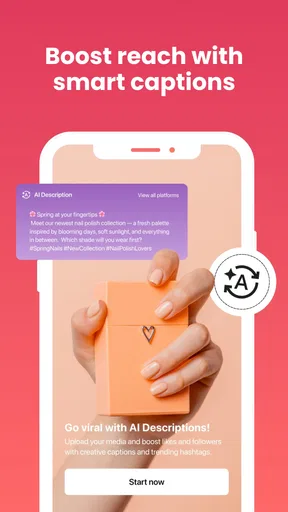
Captions provide another reason to return, particularly when the visual material is ambiguous. A short line can explain where a photo was taken, identify a person, or add humor that the image alone does not carry. I would keep captions brief and check them against the background for readability. A visually attractive story becomes frustrating when the text is too small, too close to the edge, or placed over a busy part of the image.
The app has a 4.4 average from around 313 thousand ratings, with over 10 million installs. Those figures suggest that it has found a substantial audience, but popularity does not settle the personal question of whether it belongs in my routine. The better test is whether I can make a useful edit in a predictable number of steps and whether I still like the result after watching it more than once.
Maintenance is light, but creative maintenance is real
Storybeat does not demand the same maintenance as a professional editing suite, yet there is still a small habit to manage. I need to keep my camera roll reasonably organized, remove duplicate clips before importing, and avoid saving several nearly identical versions of the same story. Without that discipline, the app can make it easy to produce more files than I actually need.
I also recommend reviewing each template rather than accepting its first arrangement. Automated or guided layouts are helpful, but they do not know which face matters most, which clip contains the key action, or which image has sentimental value. A few seconds spent changing the order can improve the emotional flow more than a new filter can.
Another practical habit is to preview the complete piece with sound before sharing it. Music changes how quickly visual cuts feel, and a sequence that looks balanced in a silent preview may feel rushed once audio is added. I would also check the opening and closing moments carefully. People often remember the first image and the last image more than the middle, so weak bookends can make an otherwise good edit feel unfinished.
Storage and processing are worth considering when working with several video clips. I would avoid editing while the phone is nearly full, and I would not delete original media until the final version has been viewed outside the editing screen. This is not a criticism unique to Storybeat; it is simply the sensible way to handle mobile video. The convenience of quick creation should not encourage careless file management.
Updates can also influence the long-term experience. The current version is 4.40.3.0, and I would keep the app reasonably up to date when possible, especially if an older installation begins behaving inconsistently. Still, an update is not a reason to change the way I edit. The lasting value comes from a workflow I understand, not from chasing every new visual style.
Where fatigue begins
The biggest source of fatigue is repetition. If I use the same template structure, the same type of transition, and the same filter for every occasion, the app starts to make different memories look alike. The solution is not necessarily to search through every option. It is often better to switch between a few distinct approaches: a clean photo sequence, a music-led video, a caption-focused story, and an occasional avatar-based edit.
There is also a risk of over-editing. Filters and effects are tempting because they create an immediate change, but they can compete with faces, scenery, or product details. I would use them to support a mood rather than to hide weak source material. If a photo is poorly framed or a clip is shaky, decoration rarely fixes the underlying problem.
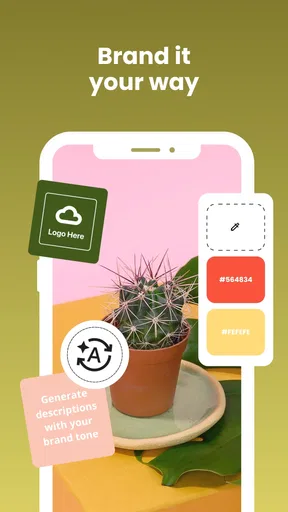
Users who need exact control may become frustrated by the guided nature of the experience. If I need frame-accurate cuts, detailed audio mixing, complex layers, or a highly specific brand layout, I would choose a more advanced video editor. Storybeat is designed around fast visual decisions, not exhaustive control. That is a strength for casual creation and a limitation for demanding production work.
People who dislike music-led social content may also find less value here. The app can work with photos, captions, filters, and effects, but its appeal is strongest when a sequence benefits from motion and atmosphere. If I only want to correct exposure, remove a blemish, or crop an image, a dedicated photo editor is usually faster and more focused.
The purchase model deserves a calm approach as well. Because the app is free to start, I can judge the basic workflow without paying. However, I would not buy an item merely because it matches one event. I would ask whether I can imagine using that style repeatedly and whether it offers something meaningfully different from the tools already available. That simple pause helps prevent the novelty of a polished preview from becoming an unnecessary expense.
Who should keep it and who should skip it
I would recommend Storybeat to someone who wants attractive short-form content but does not enjoy editing from scratch. It is a particularly good fit for casual creators, families making memory recaps, travelers assembling quick daily updates, and small sellers who need simple visual posts without building a complete production workflow.
It is also suitable for someone who tends to leave photos untouched because editing feels like work. The guided approach lowers that barrier. A user can start with a clear occasion, select the strongest material, and make a presentable result without learning a large set of technical terms. That convenience is more valuable than a long feature list when the main problem is not capability but follow-through.
I would skip it if my priority were professional precision, a completely distinctive visual identity, or advanced control over video and sound. In those cases, a dedicated editor with a deeper timeline and more manual tools would be a better long-term investment. I would also skip it if I rarely create stories or short videos, because a simpler gallery editor may cover occasional photo adjustments without adding another app to maintain.
For privacy-conscious users, I would make a personal decision based on comfort with mobile editing services and the kind of media being processed. I would avoid experimenting with sensitive images simply because a template looks interesting. The safest everyday workflow is to begin with ordinary, non-sensitive material, understand how the app behaves on the device, and keep important originals stored separately.
My long-term verdict
Storybeat earns lasting space when I use it as a focused shortcut, not as an endless source of effects. Its first-week appeal comes from quick transformations and a friendly path from camera roll to finished story. Its month-to-month value comes from repeatable occasions: recaps, celebrations, trips, updates, and small projects that benefit from rhythm without requiring professional editing skills.
The app does not eliminate creative judgement. I still need to choose good material, remove weak clips, keep captions readable, and resist effects that overpower the subject. In fact, the more guided the template, the more important those choices become. The app supplies momentum, but I supply taste and context.
With a 4.4 average and a large installed audience, it is clearly not a tool built only for a narrow group of experimenters. Still, I would not install it expecting every feature to become part of my routine. I would install it for one concrete need, such as making a travel recap or a birthday story, then judge whether the finished results are good enough to justify returning.
My recommendation is positive for casual visual storytellers who value speed, music, captions, and ready-made creative direction. I would keep it available for quick social edits and personal recaps, while reaching for a more advanced editor when precision matters. If you can accept that trade-off, the free starting point makes it easy to explore, and the app has enough variety to remain useful after the initial novelty fades.
In short, I see it as a practical photography companion rather than a complete replacement for every editor. It works best when I have a real moment to share and want help giving that moment shape. Used with restraint, it can become a small, dependable part of a monthly creative habit instead of another app that is exciting for a week and forgotten afterward.
Verdict
Strengths of Reels & Story Maker Storybeat
- Large music library for creating engaging videos
- Templates make polished edits quick for beginners
- Supports photos, videos, text, and animated effects
- Easy sharing to Instagram, TikTok, and other platforms
- Regular updates add fresh templates and creative tools
Limitations of Reels & Story Maker Storybeat
- Some premium templates and effects require a subscription
- Exported videos may include branding on the free plan
- Advanced editing controls are limited compared with pro apps
- Music availability can vary by region and licensing
- Ads may interrupt editing for users on the free version
Similar Picks in This Category
View All
Google Photos
Google LLC4.4

Gallery
Google LLC4.2

Picsart AI Photo Editor, Video
PicsArt, Inc.3.9

B612 AI Photo&Video Editor
SNOW Corporation4.1

BeautyPlus-Selfie Photo Editor
PIXOCIAL TECHNOLOGY (SINGAPORE) PTE. LTD.4.5

Remini - AI Photo Enhancer
Bending Spoons4.1
Frequently Asked Questions
What is Reels & Story Maker Storybeat used for?
Reels & Story Maker Storybeat is a mobile editing app designed for creating social media content such as Instagram Reels, Stories, TikTok videos, photo slideshows, and short promotional clips. It combines photos, video snippets, music, text, filters, transitions, templates, and visual effects in one editor, making it useful for beginners who want polished results without learning complicated professional software.
Is Reels & Story Maker Storybeat free to download and use?
The app can generally be downloaded for free, but some templates, effects, music options, editing tools, and export features may be restricted to premium users. Depending on the version and platform, Storybeat may offer subscriptions or in-app purchases. Before confirming a purchase, check the pricing, billing period, trial conditions, and cancellation details shown in the App Store or Google Play.
Can I create videos with my own photos, videos, and music?
Yes, the editor is built around personal media, so you can usually import photos and video clips from your device and arrange them into a slideshow or short social video. You can also add music from the app’s available library or use compatible audio from your device, subject to platform permissions and copyright restrictions. Always confirm that you have the right to use music in published content.
Does Storybeat add a watermark or reduce video quality when exporting?
Export conditions can depend on the selected template, editing feature, account type, and current app version. Some free projects or premium-style tools may include limitations such as a watermark, advertising, or restricted resolution, while paid access may provide cleaner exports or additional quality options. Review the preview and export screen carefully before saving or sharing your finished video.
Is Reels & Story Maker Storybeat suitable for beginners?
Storybeat is mainly aimed at casual creators and beginners rather than users seeking a full professional video-production suite. Its templates and straightforward editing workflow make it easy to combine media, music, text, and effects quickly. However, advanced editors may find the timeline controls, audio editing, color correction, and fine-grained customization less comprehensive than those in dedicated professional applications.
